01
Fastest route
Install automatically
Run EAC Codecs, let it detect Exact Audio Copy, and choose the encoder components you want installed.
- Automatic EAC detection
- Predictable encoder location
- Component-selectable install
- Verified setup guidance
Use the EAC Codecs installer for a quick, predictable setup, or choose individual encoders and follow step-by-step manual instructions for Exact Audio Copy.
Both routes are documented around a predictable EAC encoder folder, so you can start manually and use the installer later without learning a completely different layout.
Run EAC Codecs, let it detect Exact Audio Copy, and choose the encoder components you want installed.
Pick the codec and build you want, download it from the preferred source, place it in EAC's encoder folder, then configure EAC yourself.
The installer detects Exact Audio Copy, targets its Encoders directory, and lets you select individual components.
Archival and ecosystem-friendly lossless formats for bit-perfect audio storage.
Compare lossless codecs →Efficient perceptual codecs covering broad compatibility and modern compression.
Compare lossy codecs →CD-focused surround encoders, including native 44.1 kHz DTS and automatic AC-3 resampling.
Compare surround codecs →Tools for extracting and decoding specialist audio carried on compatible compact discs.
Explore specialist CD tools →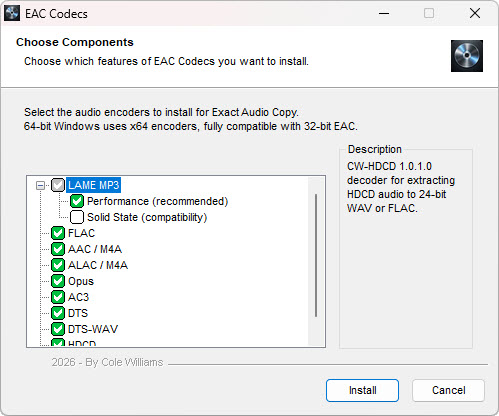
EAC Codecs is intended to make external-encoder setup predictable rather than replace each codec's own documentation. Choose the components you need, install them into EAC's encoder directory, then use the concise setup pages on this site.
The recommended Performance build uses modern CPU optimisations and multithreading. Solid State is a compatibility-focused alternative with minimal CPU-specific optimisation.
Compare LAME builds →Each guide will document the executable, extension and command line after verification against the actual encoder build.
Open setup guides →Quick answers to common setup questions, with more detail in the full FAQ and encoder guides.
No. EAC Codecs installs external encoders and specialist CD tools for use with Exact Audio Copy, which remains a separate application.
Read the FAQ →Yes. EAC launches the encoders as separate programs, so native x64 builds work normally with 32-bit EAC on 64-bit Windows.
Compatibility answers →The EAC Guides page contains the verified executable, extension, tagging setting and command line for each supported tool.
Open EAC Guides →